Harnessing the Power of an Editable 12 Goals Planner for Amazon KDP Publishing
Setting meaningful goals often starts with a single clear page, but scaling that practice into a complete, reusable system transforms occasional intention into consistent achievement. The Goals Planner Editable Amazon KDP framework offers precisely that shift. Instead of scribbling aspirations on scattered notes, you gain a structured set of twelve planner templates—each designed to be customized, printed, and even published for others seeking the same clarity. These are not fixed pages locked into a single layout. They arrive as editable Canva files, ready to adapt to your exact vision, whether you’re creating a personal success journal or preparing a professional interior for a KDP book.
Why a Dozen Distinct Planner Pages Matters More Than a Single Template
Conventional goal planners often rely on one repeated sheet, expecting users to photocopy the same structure for every objective. That approach misses a critical insight: different milestones demand different types of thinking. The twelve-page collection design addresses this by providing variation—each template can serve a unique role in your goal cycle. Some pages might focus on initial brainstorming and vision mapping, while others shift toward action breakdowns, weekly tracking, or reflective review. This diversity mirrors how real goal pursuit unfolds, moving from abstract desire to concrete steps to lessons learned.
When you open the included PDF files, you’ll notice that no two planner pages are exactly alike. That intentional variation helps prevent the monotony that often derails long-term planning. For Amazon KDP creators, this variety also increases the commercial appeal of a finished journal because buyers perceive greater value in a multi-format interior that guides them through the entire process.
Inside the Digital Download: What Arrives in Your ZIP File
The package is delivered as a digital download, meaning you gain immediate access after purchase without waiting for physical shipping. Unzipping the file reveals several components carefully arranged to support both quick use and deep customization. You’ll find:
- A PDF file containing the Canva link, which opens the entire template collection for editing with Canva Pro.
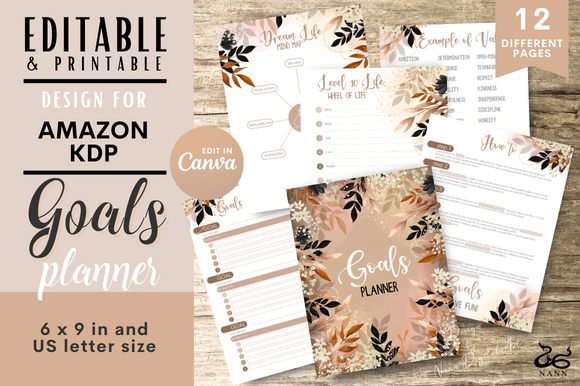
- A ready-to-use PDF with all 12 planner pages, already formatted for printing if you prefer not to make changes.
- Two distinct size options for the editable files: 6×9 inches, which is a popular portable trim size for KDP paperbacks, and 8.5×11 inches, suitable for standard letter-sized notebooks or larger workbooks.
Having both sizes from the start eliminates the frequent headache of reformatting interiors when your publishing vision shifts between a pocket planner and a desk-sized journal. The 6×9 format performs especially well for Amazon KDP because it aligns with customer expectations for compact, carry-friendly planners, while the 8.5×11 variant appeals to users who want ample writing space for detailed mind maps or project breakdowns.
Customization Without Design Expertise: Working Inside Canva
The heart of the Goals Planner Editable Amazon KDP advantage lies in Canva’s drag-and-drop environment. Even if your design background is minimal, you can make meaningful modifications that set your planner apart. The provided Canva link opens a template workspace where you can alter fonts, swap color palettes, insert your own branding or inspirational quotes, and rearrange elements to match a specific theme. Canva Pro’s features—like background removal, premium photo access, and one-click resizing—amplify what’s possible without requiring advanced graphics software.
A practical workflow looks like this: you start by opening the link and immediately saving a copy to your own Canva account. Next, you scan through all twelve pages to understand their flow. Some creators might keep the existing structure but change the accent colors to match a seasonal release or a specific niche, such as fitness goal tracking or financial independence planning. Others might relabel sections to fit a unique methodology, like SMART Goals or the WOOP framework (Wish, Outcome, Obstacle, Plan). The editable text layers make renaming fields straightforward—simply double-click and type.
Aligning the Planner Structure with Effective Goal Fulfillment
Printable planners succeed only when their layout nudges the user toward action. These twelve pages were designed to guide that behavioral sequence. The early templates often emphasize discovery: space to articulate core values, long-term visions, or the emotional why behind each goal. Without this foundation, goals can feel hollow. Subsequent pages transition into specificity—breaking annual objectives into quarterly milestones, monthly targets, and weekly tasks. The inclusion of a progress-tracking element, such as a habit checker or a milestone log, closes the loop by providing visual feedback.
Consider a real-world example: someone aiming to write a novel within six months. They might use the first planner page to brainstorm chapter themes and word count targets. The next page helps them schedule writing blocks across the week. A later page acts as a weekly review, where they note word counts achieved and obstacles encountered. By the final page, they’re not just staring at a blank goal line; they’ve built a thorough record of their journey. This layered approach turns the planner into a motivator, not merely a recorder.
Why Amazon KDP Publishers Value Editable Planner Interiors
Self-publishing on KDP means competing in a marketplace saturated with planners. The ability to start with a proven, editable base drastically reduces production time while maintaining quality. Instead of designing twelve pages from scratch—a task that can consume days or require hiring a freelancer—you download the package, customize it in a few hours, and export a print-ready PDF for upload. The templates are already formatted with margins and bleed considerations suited for KDP standards, which means fewer technical rejections during the review process.
Moreover, the dual size offering lets you create multiple versions of the same planner. You might publish a 6×9 "On-the-Go Achievement Journal" and an 8.5×11 "Comprehensive Annual Goal Mastery Workbook" using the identical base, simply adjusting the size selection before editing. This multiplies your product line without multiplying your design workload. The editable nature also allows you to test different covers, color themes, or niche adaptations—wellness goals, entrepreneurial targets, academic planning—so you can refine your bestseller based on actual customer feedback.
Maximizing the Planner’s Usefulness Beyond Publishing
While the KDP angle is strong, these editable pages serve individual productivity equally well. You don’t need to publish a single copy to benefit; you can print the customized pages for your own binder, use them as inserts in a discbound notebook, or fill them digitally on a tablet with a stylus. Because you control the file via Canva, you can choose to print only the pages relevant to your current projects, rearranging their order to follow your logical sequence. A student managing academic and personal goals might prefer the 8.5×11 size for taking detailed notes, while a traveling consultant might print the 6×9 version to slip into a folio.
Teachers and coaches can also incorporate these pages into workshops. A career coach, for instance, could customize the templates with their own branding and guiding questions, then hand them out during sessions. Clients leave with a physical artifact that keeps the coaching conversation alive between meetings. The editability makes it simple to replace a reflection prompt with one that fits a specific coaching philosophy without altering the clean underlying design.
Understanding the Formats, Sizes, and What “Editable” Truly Means
The package description emphasizes 100% editable with Canva Pro, which is a crucial distinction. Free Canva accounts often limit access to certain design elements and resizing features, so Canva Pro unlocks the full potential. However, you’re not locked into a proprietary format: after customization, you download standard PDFs that are universally printable. The provided ready-to-use PDF is a baseline if you need something immediately, but the editable version is where the real value unfolds.
File sizes are thoughtfully chosen. The 6×9-inch layout matches many popular KDP planner trim sizes and produces book pages that feel comfortable in hand. The 8.5×11-inch layout suits spiral-bound notebooks or standard office printing. Both maintain consistent typography and element spacing that reads well even after minor adjustments. When editing, avoid crowding the margins—Canva’s alignment tools help maintain the breathing room that makes a page pleasant to fill out. For KDP interiors, ensure that any added elements stay within the safe zone to prevent clipping during printing.
Practical Steps from Download to a Finished KDP Publication
Turning the ZIP file into a live product on Amazon involves a straightforward sequence. After downloading, unzip the contents and open the PDF to locate the Canva template link. Follow the link, make your desired edits, and then download the editable file as a PDF Print. For KDP, you’ll typically need a PDF that includes the interior pages only, without any cover content. Before uploading to your KDP account, verify the page count is divisible by the required signatures for your chosen trim size. Often that means adjusting or duplicating a page slightly if needed, which Canva easily handles.
A common pitfall is neglecting the first page—the open, prompt-free template. Use that page to introduce the planner’s philosophy or to create a personalized table of contents. This establishes a branded experience immediately. Also, if your planner includes any personal or business logos, embed them as solid-colored elements rather than heavy photographic files to keep the PDF file size manageable and compliant with KDP’s upload limits. The editable planner pages arrive as clean, vector-friendly designs, so added graphics generally integrate without bloating.
Comparing the One-Off Use to a Sustainable Planning System
Many people download a planner, fill it once, and then search for the next new design. The Goals Planner Editable Amazon KDP approach encourages sustainability. Because you can revisit the Canva link, modify the pages for the next year or for a completely different type of goal, you create a reusable asset. A parent might adapt the same templates each January for a family goal binder, altering the cover colors and a few prompt words to suit growing children. An entrepreneur could re-customize the pages quarterly to reflect shifting business priorities, printing fresh copies without purchasing a new product each time.
This reusability extends to the publishing side as well. Once you’ve invested time learning the Canva editing workflow, you can rapidly spin off variations. You might release a “12 Goals Wellness Edition” after a fitness season, then a “12 Goals Career Edition” following graduation cycles, each differentiated by minor text tweaks, accent hues, and cover design. The underlying IP remains yours, but the editable template eliminates repetitive layout work.
How the Twelve Pages Map to a Complete Goal Cycle
Visualize the twelve pages as a chronological toolkit. The journey might start with a page for identifying core focus areas—health, relationships, finance, creativity. Next, a page dedicated to writing a vivid one-year vision statement. The third page transitions to setting three to five primary goals, each with a deadline and key motivator. Subsequent pages zero in on action plans: monthly goal breakdowns, weekly priority lists, and daily intention sheets. A dedicated habit tracker page sits in the middle to shore up consistency, while a reflection page prompts end-of-month reviews. Toward the end, a milestone celebration log reminds users to acknowledge progress, and a final page invites setting intentions for the next cycle.
When printed or published, this sequence creates a natural rise and fall of effort, mirroring the way our motivation ebbs and needs reinforcement. Users aren’t just completing pages; they’re moving through a curated experience. The editable nature of each page means you can reorder this flow, insert an extra gratitude checkpoint, or remove a section that doesn’t resonate with your audience. The underlying wisdom is that consistent achievement requires both structure and flexibility, and these pages deliver the scaffolding for both.
Overcoming the “Blank Page” Paralysis
A chief obstacle in goal planning is staring at an empty notebook without guidance. The Goals Planner Editable Amazon KDP templates confront this by providing carefully worded prompts that spark immediate reflection. Even before customization, the default text asks strategic questions: “What would make this goal meaningful?” or “What resources do you already have?” These nudges transform the blank space from intimidating to inviting. When you customize, you can dial the prompt language up or down, making it more directive for a beginner audience or more open-ended for experienced planners who need minimal guidance.
Additionally, the visual design—clean lines, balanced white space, and subtle organizational elements—reduces cognitive clutter. A cluttered page stifles thinking; a well-designed one channels it. By editing the templates, you can further refine this clarity. For instance, if you notice that a particular font feels too playful for a business audience, swap it for a sharper sans-serif. The ability to endlessly tweak ensures the final product matches the psychological tone you intend, which dramatically affects how users engage with the content.
Leveraging the Planner for Niche Markets and Specialized Audiences
Because the files are fully editable, you aren’t confined to a generic “goals” title. The same twelve-page structure can become a “12 Goals for Real Estate Agents” planner by rewriting prompts to focus on lead generation, closing targets, and prospecting routines. It could become a “Senior Year Goals Countdown” by tailoring pages to college applications, scholarship deadlines, and extracurricular milestones. The bones of the planner—twelve distinct, well-organized sheets—serve any domain where people set measurable objectives and benefit from structured tracking.
This adaptability translates into strong SEO potential when you publish on KDP. Rather than competing broadly, you occupy a niche: a planner for new parents setting postpartum wellness targets, a planner for aspiring digital nomads mapping income and travel goals, or a planner for hobbyist gardeners planning a year of planting and harvest cycles. The editable foundation makes it economical to produce multiple niche versions without commissioning fresh designs each time. From a user’s perspective, the planner feels bespoke, which builds loyalty and repeat usage.
Ensuring Print Quality and Consistency Across Editions
When preparing your final PDF for KDP, pay attention to a few technical details. The original templates are set with high contrast and crisp typography, but heavy editing can unintentionally shift element alignment. Use Canva’s grid and ruler features to maintain consistency across all twelve pages. Fonts should remain uniform unless you deliberately vary them for a section header. If you add imagery, ensure it’s at least 300 DPI to avoid pixelation in print. Also, download the PDF in the CMYK color profile if that option is available, as this more closely matches printing output compared to RGB screens.
For those who intend only personal use and print at home, test on a single sheet first. Verify that margins are adequate for your printer model and that the ink levels don’t wash out lighter elements. The 8.5×11 version printed on premium paper creates a substantial planning binder, while the 6×9 version works well when bound with a personal coil machine or simply three-hole punched for a mini binder. The digital files are designed to withstand repeated printing without degradation, so you can run copies for months on end.
Where the Planner Fits in a Broader Productivity Ecosystem
No planner exists in isolation. The twelve pages complement digital tools like calendar apps or project management software. Many individuals use the planner pages for initial visioning and weekly planning, then enter daily tasks into a to-do app. The physical act of handwriting in these templates solidifies commitment in a way that pixels alone sometimes don’t. Coaches might ask clients to bring their filled pages to sessions, turning a digital download into a tactile coaching artifact. The Goals Planner Editable Amazon KDP becomes the analog anchor in a sea of digital noise, precisely because you shaped it to fit your personal or brand voice.
Reflecting on the entire process—from downloading the ZIP file through customizing in Canva to holding the printed result—reveals why editable templates have surged in popularity. They put creative control in your hands without requiring you to start from emptiness. You receive a license to iterate, to experiment, and to publish a product that feels authentically yours. The included twelve pages are more than a stack of PDFs; they form a flexible framework that, with a few clicks, transforms into a powerful engine for goal realization, whether for yourself or for a growing readership on Amazon.